Building an AI assistant that debugs and writes code directly inside the Unity Editor
We built a context-aware AI assistant that embeds natively into the Unity Editor, giving game development teams the ability to resolve bugs, implement features, and write cleaner code — all without stepping outside their existing workflow.
Experienced engineers spending two hours a day on bugs that followed the same patterns
Senior time lost to repetitive debugging
The same categories of bugs kept resurfacing, pulling experienced developers away from work that actually required their skill level. Hours per sprint, compounding across every title the studio was running simultaneously.
Junior engineers couldn't self-serve
Without deep codebase familiarity, junior developers leaned heavily on senior teammates to interpret errors and trace bugs — a bottleneck that slowed the whole team down regardless of who was causing it.
It had to live inside Unity
A tool that required switching windows, opening external apps, or copying stack traces into ChatGPT would not be adopted. It had to feel like part of the editor itself — not a workaround bolted on the side.
This delivery was also a capability test
The studio wanted to see whether we could integrate at a deep technical level before committing to a longer engagement. The quality of this project would determine everything that came after.
A raw error becomes a reviewed fix — without leaving the editor
Deep editor integration without blocking Unity's main thread
Intercepting console logs, parsing stack traces in real time, and streaming to an external LLM — all without blocking Unity's main thread or causing editor instability — forced careful, non-obvious architecture from day one. Working within Unity's Editor API at this level meant every integration decision had a consequence for editor performance. Asynchronous communication with the LLM and fully streaming responses were requirements from the start, not performance improvements added later.
A raw stack trace tells you where something broke, never why. For suggestions to be genuinely useful, the system needed to automatically gather the relevant C# scripts, scene structure, and asset references before the model ever saw the error. And because the tool writes to live files, a diff-preview with instant rollback had to ship before any write feature went live — without it, a single bad suggestion would have permanently eroded trust in the product.
Four things it does — built and tested against real errors from a live codebase
Real-time console monitoring
Hooks Unity's event system and surfaces errors in the assistant panel automatically. The moment something breaks, the assistant already knows — no trigger, no copy-paste, no context switching required.
Context-aware fix suggestions
Gathers the relevant scripts and project data per error before the model sees anything. Suggestions come back specific to the project — not generic Stack Overflow answers that still need interpreting and adapting.
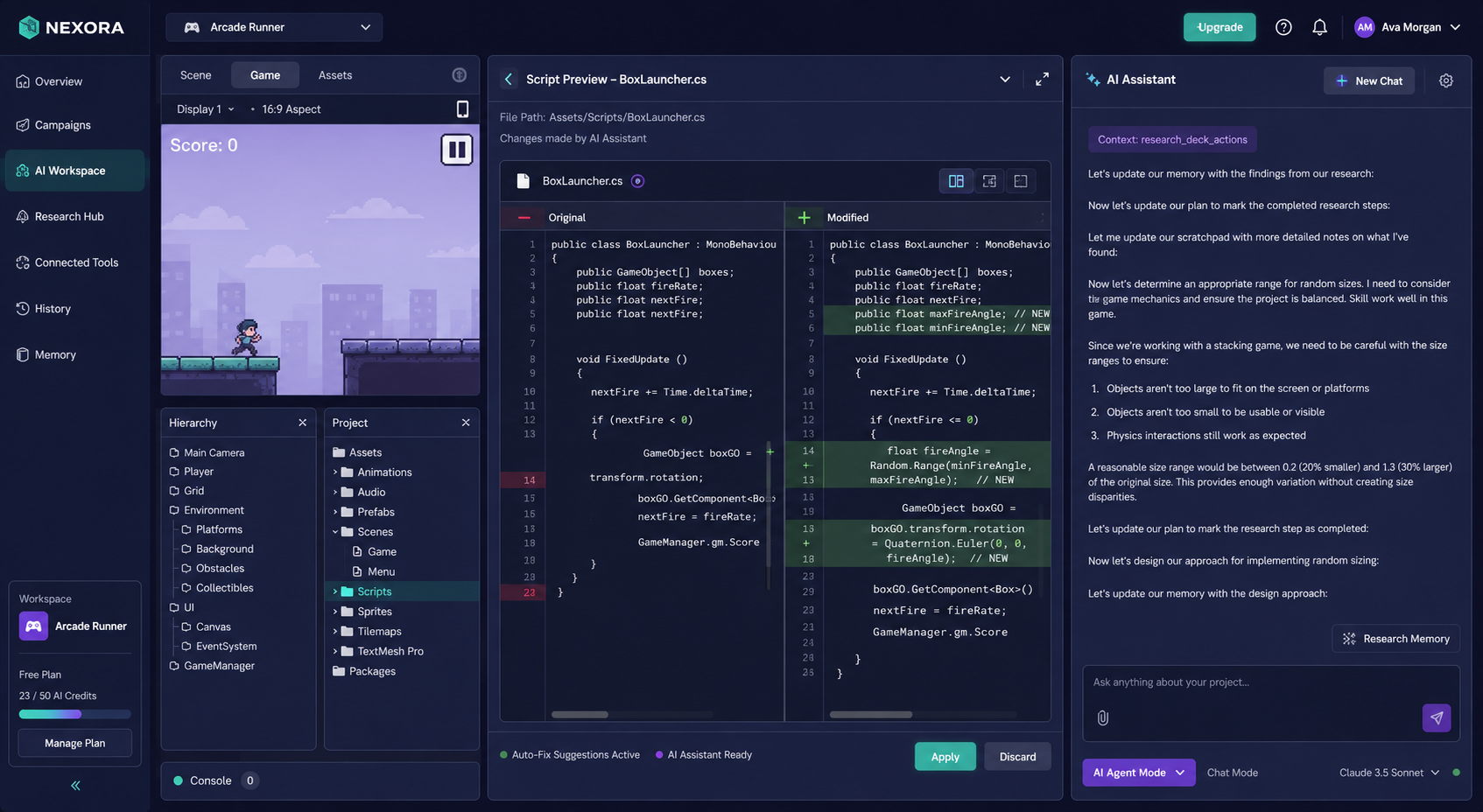
Diff preview and one-click apply
Every suggested change shown as a syntax-highlighted diff before anything is touched. Apply with one click or dismiss entirely. No file editing, no terminal, no risk of an untested change breaking the build.
Plain-English feature implementation
Describe what you want to build, get working C# scaffolded to match the patterns already in your project. Became the most-used capability within two weeks — engineers using it to scaffold new gameplay systems faster than writing boilerplate by hand.
Deployed in six weeks. Bug triage down 65%. Second engagement signed immediately after.
Want AI that works inside your development environment — not alongside it?
We build deep, native integrations that fit how your team already works. Editor tooling, AI developer experiences, and the architecture that makes them feel effortless. Let's talk.
Let's Talk →